Knowledge hub
How to Write a Professional Email in English
Learn how to write a professional email in English with clear steps, polite request templates, and a final checklist for global workplace communication.
You're already in the moment many people dread: the message is drafted, the cursor is blinking, and the next click decides whether your colleague, client, or professor understands you clearly. In business English, the hard part usually isn't finding words, it's making the request easy to act on, while sounding respectful across cultures and levels of formality.
A professional email works best when it helps the reader answer one question quickly, what do you need from me? That is why strong email writing is less about perfect grammar in isolation and more about pragmatic correctness, the combination of clarity, tone, and purpose that makes the message usable in a real workplace.
Table of Contents
- The Five Stages of a Clear Business Email
- Structuring Your Message From Subject to Signature
- Adjusting Tone and Politeness for Global Readers
- Using AI Tools Without Losing Your Authentic Voice
- The Pragmatic Editing Sequence Before You Send
- Your Pre-Send Checklist and Next Steps
The Five Stages of a Clear Business Email
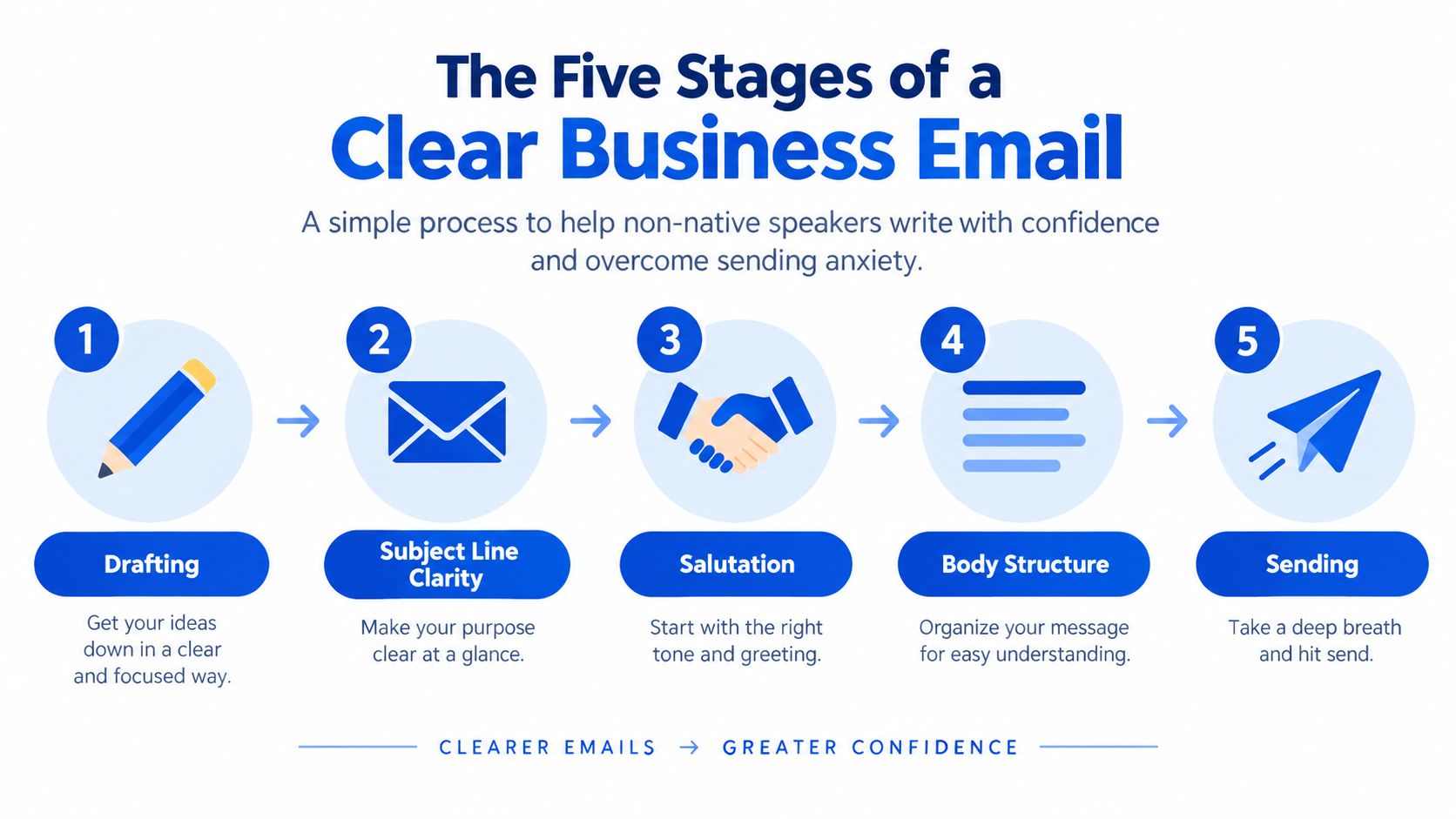
The safest way to approach how to write a professional email in English is to treat it like a small workflow, not a language exam. Email has been a standard form of networked communication for more than five decades, and the basic logic still holds, the destination and purpose must be obvious fast, because the reader is busy and the message may become part of a lasting record (history of email).
Start with one purpose
A professional email should do one job. If you need approval, ask for approval. If you need a reply, make the reply easy to spot. If you need a document, say exactly which document you want.
Practical rule: one email, one main action. Extra context is fine, but it should support the request, not hide it.
Build the message in five stages
A reliable structure keeps the reader oriented from the first line to the last:
- Define the purpose and the recipient's required action.
- Write a subject line that names the topic, and the deadline if that helps.
- Open with a greeting and state the reason for writing in the first sentence.
- Add only the context needed, using short paragraphs or bullets.
- Close with a clear next step, deadline, and signature.
This structure works because it matches how people scan email. It also connects directly to practical communication habits used in international workplaces, where short, direct, and organized messages reduce confusion. For learners who want more practice with workplace language, Englify's Business English communication guide fits well with this approach.
Keep the reader's action visible
A professional email should never force the reader to guess. Short paragraphs help, but so do precise dates, explicit deadlines, and a closing line that names the next move. The original email may have started as a test, but modern business email carries responsibility, and that means every sentence should help the recipient decide what to do next.
Structuring Your Message From Subject to Signature
A business email reads more clearly when each part has a job. The subject line tells the reader why the message matters. The greeting sets the level of formality. The opening sentence gives the reason for writing. The sign-off closes the exchange in a way that makes reply or action easy.
Subject lines that tell the truth
Subjects like “Hello,” “Important Matter,” or “Question” leave the reader guessing. They also make the thread harder to find later. A stronger subject names the topic or action, such as “Request to reschedule Tuesday's interview” or “Invoice approval needed by Friday.”
If the email starts a new topic, give it a new subject line instead of keeping the old thread alive. That small change helps busy readers scan their inbox and helps you keep related messages in order.
Greetings that match the relationship
The greeting should reflect how well you know the recipient. “Dear Ms. Haddad” suits a formal first contact. “Hi Team” fits a group message where the relationship is already established. If you do not know the person's title, the full name is safer than guessing.
The first sentence should do the work that matters. “I'm writing to confirm tomorrow's meeting time” gives the reader the point immediately. A long introduction about your week or workload only delays the message. In professional email, the reader should understand the purpose before the second paragraph begins.
Sign-offs that close cleanly
A complete email ends with a polite closing and a clear signature. “Sincerely,” “Best regards,” “Best,” and “Thank you,” all work well, as long as they match the tone of the message. After the closing, add your name. If you expect a reply or follow-up, include your role, company or school, and contact details.
For ready-made phrasing you can adapt, Englify's business English resources for professionals include email and meeting language you can borrow directly.
Adjusting Tone and Politeness for Global Readers
A request can be correct and still miss the mark if the tone does not fit the reader. In multilingual workplaces, that matters because urgency, hierarchy, and formality are read differently across Arabic-, French-, and English-speaking cultures.
Three request patterns you can choose from
The same request can sound quite different depending on the relationship and the task.
| Context | Example Phrasing |
|---|---|
| Time-sensitive operational task | Could you please send the revised file by 3 p.m. today? |
| Senior manager or formal contact | I would appreciate it if you could review the attached proposal when you have a moment. |
| Cross-cultural partner or ongoing relationship | Would you mind confirming the final schedule, so we can align the next steps? |
The first version gets to the point quickly. The second keeps the request polite without making it cloudy. The third protects the working relationship while still making the action clear. None of these is always the right choice, because the reader, the task, and the level of trust all shape the best wording.
Plain international English works better
Idioms, sarcasm, and very local expressions can create avoidable confusion. A phrase that feels warm in one setting may sound abrupt or dismissive in another. Simple wording like “Please confirm the meeting time” travels more reliably than clever phrasing, and bullet points help when you have several things to ask about.
Directness helps reduce ambiguity. Courtesy then softens the edge with “please,” “could you,” or “I would appreciate it if.” That balance usually reads as professional without sounding cold.
When the relationship changes, the language should too
A message to a long-term colleague can be less formal than a note to a new client or university contact. If the other person writes in a friendly style first, you can still reply with a little more structure without seeming distant. The key is to match the working relationship, not to copy every word the other person uses.
For learners who want a broader view of formal and semi-formal language, Englify's English for professionals page shows how email, meeting, and presentation language shift across workplace settings.
Using AI Tools Without Losing Your Authentic Voice
AI can help with grammar, vocabulary, and sentence structure, but it can also flatten the human side of an email. That matters because recipients don't only read correctness, they also read responsibility, sincerity, and confidence in the sender.
Safe help and risky outsourcing
Low-risk support includes spelling checks, rephrasing for clarity, and turning rough notes into short bullet points. High-risk outsourcing includes apologies, refusals, negotiation messages, complaint replies, and sensitive feedback. Those messages carry relationship work, so the sender needs to own the words fully.
A study of 1,100 working professionals found that medium and high levels of AI use could make readers question the sender's authorship, confidence, caring, sincerity, and ability (AI-assisted workplace writing study). Earlier research with almost 900 professionals also found that AI-generated messages could seem effective and professional while feeling less sincere and caring when recipients knew AI had written them.
Use AI as a coach, not a ghostwriter
The safest workflow is simple. Draft the idea yourself, ask AI to improve wording or structure, then rewrite the final version in your own voice. That way, the message keeps your meaning, your accountability, and your relationship with the reader.
If you use AI, check for invented details, overpolite phrasing that doesn't sound like you, and sentences that feel formally correct but emotionally empty. The point is not to sound machine-like or to avoid support altogether. The point is to keep human judgment at the center of the message.
A polished email can still feel impersonal if it sounds borrowed. A human-written revision usually reads better, especially when the message asks for action or carries any emotional weight.
The Pragmatic Editing Sequence Before You Send
A final check should start with meaning, not tiny grammar details. An email can be grammatically clean and still feel harsh, unclear, or socially awkward. That's why the order of review matters.
Check the action first
Ask yourself what the reader is supposed to do, and by when. If the action isn't visible, the email isn't ready. If the deadline is vague, make it explicit. If the request can be misread, rewrite it.
Soften the tone where needed
Replace commands with respectful requests when the relationship calls for it. Remove blame, emotional intensifiers, unexplained abbreviations, and too much punctuation. Then check modal verbs like could, would, and please to make sure the level of formality fits the situation.
Proofread last, not first
After the message is clear and polite, reread it for spelling, grammar, capitalization, and punctuation. Spell-check helps, but it won't catch every wrong name, missing negative, or tone problem. A workplace survey found that 64% of respondents had sent embarrassing typos or grammatical errors, which is a strong reminder that final proofreading matters (workplace-email survey).
The same study also showed that impolite messages were rated as the most bothersome by 74.5% of businesspeople, while messages linked to non-native English writing were rated least bothersome by 64.1% of participants. The practical lesson is simple, pragmatic correctness comes before perfection.
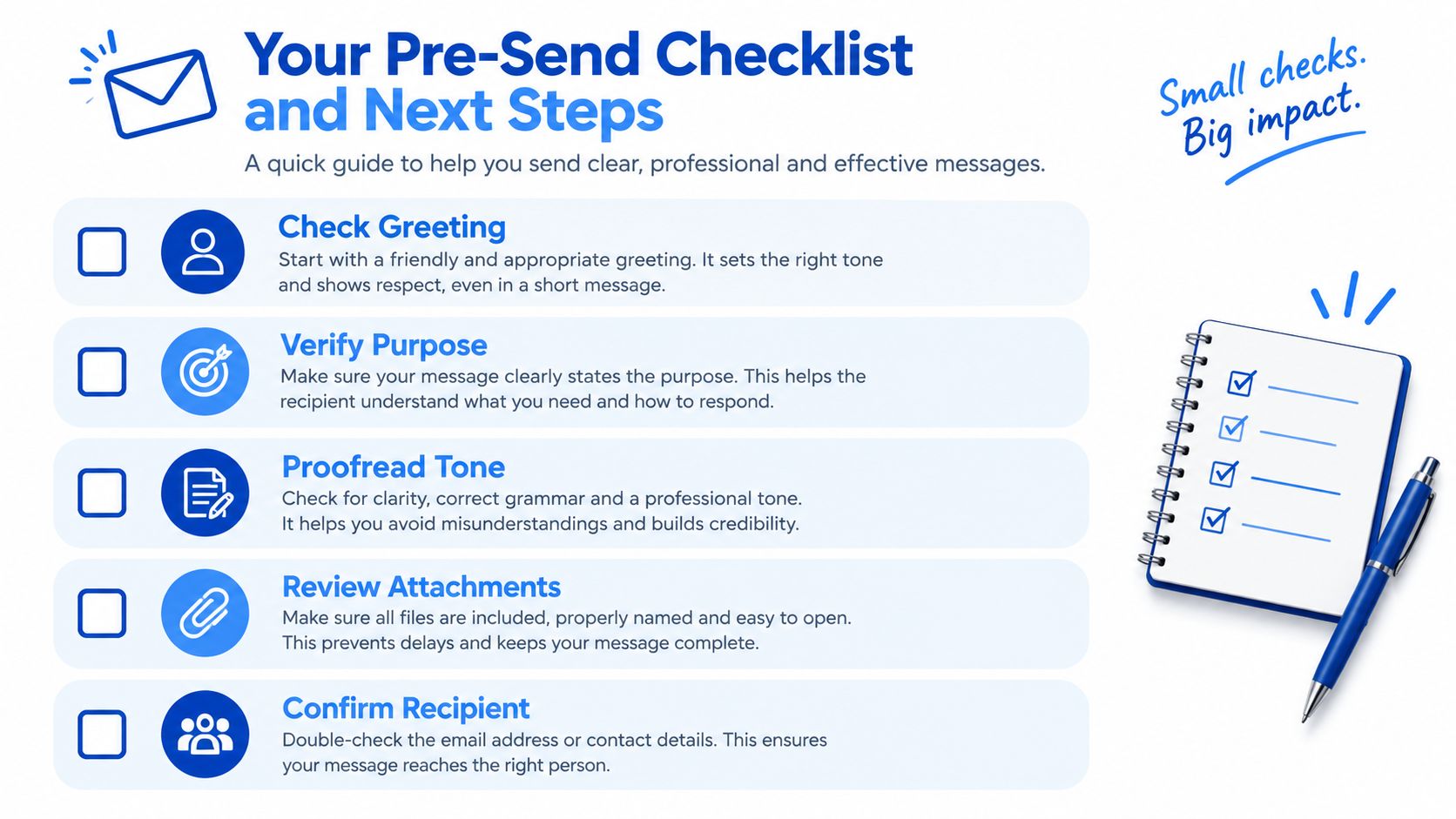
Your Pre-Send Checklist and Next Steps
Before you hit send, run through a short list:
- Check the greeting and make sure it fits the relationship.
- Verify the purpose so the main request is obvious.
- Proofread the tone and remove anything that sounds abrupt.
- Review attachments before sending the message.
- Confirm the recipient and the subject line match the email's content.
A professional email is strongest when it is easy to understand, easy to reply to, and appropriate for the person reading it. If you want guided practice with live feedback, Englify's Business English for professionals connects email writing with speaking confidence, meetings, and other workplace tasks in a structured way.
Englify offers live online English classes through Google Meet, with small groups and private lessons that support practical workplace writing like professional emails. If you want to improve your tone, clarity, and confidence in real business situations, visit Englify and see how their Business English training can fit your goals.